As an accessibility agency, we see every day how digital barriers hold users back. That is why we work with technologies that advance digital inclusion. One of the solutions we recommend most often, and that we have integrated on our own site, is ReadSpeaker.
In this article we share what we have learned about why text to speech (TTS) is such a powerful tool, and how we put it to work in practice.
What using ReadSpeaker taught us
When we added ReadSpeaker to our website, we were pleasantly surprised by how straightforward the integration was. Within a very short time, visitors could listen to our content as well as read it.
The benefits showed up immediately, and across very different groups. People with a visual impairment or with reading difficulties told us they understood the content better, while other visitors, professionals multitasking through their day or readers whose first language is not Dutch, simply appreciated having an audio version.
Why text to speech is a game changer
Text to speech solutions like ReadSpeaker are often filed under one specific audience, usually people with a visual impairment. In practice, they turn out to serve far more people than that.
Whether someone prefers to listen while travelling, or is busy and wants to keep their hands free, text to speech offers a flexible and efficient way to make content more accessible, and more engaging, for everyone.
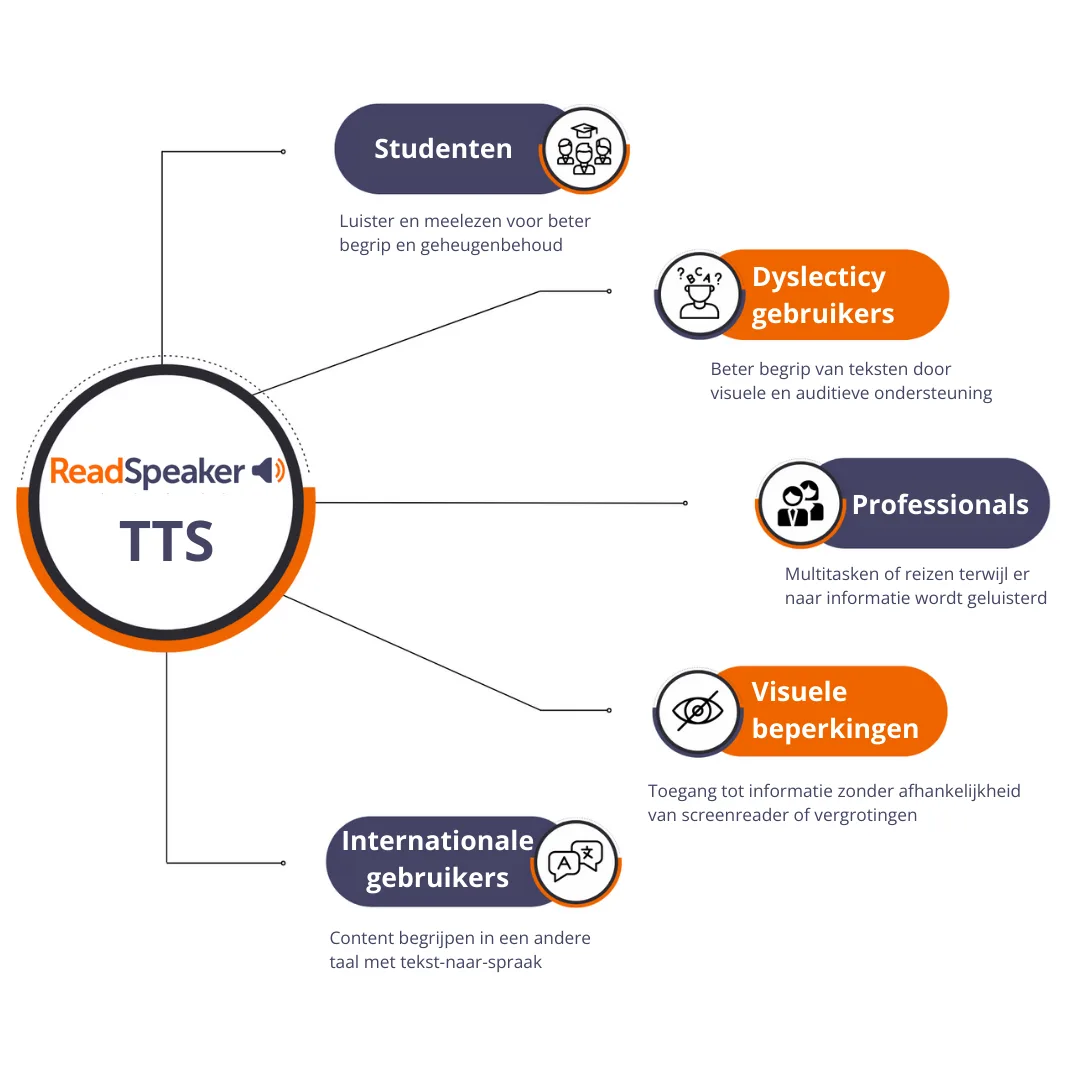
(enlarge image)How text to speech helps different readers. Students listen and read along for better understanding and recall. Users with dyslexia get visual and audio support at the same time. Professionals multitask or travel while they listen. People with visual impairments reach information without depending on a screen reader or magnification. International users take in content in another language.
An eye-opener in the field
While running an accessibility audit for a client, something stood out. The website largely met the WCAG guidelines, and yet some users were still running into trouble.
One visitor with dyslexia put it perfectly:
The information is there, but I really have to work at it to take it in.
That was the moment we recommended ReadSpeaker. Once text to speech was added, the effect was immediate: more interaction, longer time on page, and above all a much better experience.
Our audits keep showing us how websites and digital platforms put obstacles in front of their users. A well integrated text to speech solution removes those obstacles straight away. People choose for themselves how they take in information, which makes a site easier to use and turns accessibility into a real strategy rather than a checkbox.
Practical implementation tips
To get the most out of ReadSpeaker, a few points are worth keeping in mind:
Put the listen button somewhere logical and clearly visible. Nobody should have to hunt for the option to have text read aloud.
Make the experience intuitive. Test the feature with different audiences to check that they can use it without help.
Make sure reading aloud works with dynamic content. Some sites load text through JavaScript, which can need extra configuration.
Combine ReadSpeaker with your other accessibility measures. Think of solid contrast ratios, clear navigation and plain language.
Ready for the future of digital accessibility
With stricter digital accessibility rules arriving, the European Accessibility Act among them, it pays to think ahead.
ReadSpeaker and technologies like it help organisations share their content more effectively. Text to speech can be a valuable part of a broader digital inclusion strategy, one that widens the accessibility of your website and supports a larger audience.
At Bureau Toegankelijkheid (the Dutch accessibility bureau) we help organisations with strategic advice and practical solutions for digital accessibility.
That covers accessibility audits and UX work, and it also covers support in rolling out technologies such as ReadSpeaker.
Accessibility doesn’t end when a course is published. It continues throughout the learner journey. Discover how ReadSpeaker and Brickfield, as Certified Moodle Integrations, help institutions build accessibility into every stage of learning.
The importance of transparency, accessibility, deployment control, and trustworthy digital communication across enterprise, industrial, public service, and learning environments
Nearly one year after the European Accessibility Act, mobile accessibility is reshaping inclusive UX. See how audio-assisted experiences and text to speech support more flexible mobile interactions.
·8 min read
We build ethical technology that respects every user. Your privacy is no exception. Before you choose, we measure how the site is used without any cookie and without identifying you. Everything else waits for your consent.