

AI Text to Speech for Workplace Training
Unlock employee potential using text to speech
- Create voiceovers with over 280+ AI voices
- Support staff with disabilities and respect ADA requirements
- Bring audio to the LMS and any content
- Easy to use, easy to integrate












Our assistive technology provides a better learning experience for employees and employers
Roughly 1 in 4 employees have reading difficulties or are reading in a second language. Workplace training is more effective when employee learning is inclusive, effective, and engaging.
Make training enjoyable, engaging, and easy for all learners. Adding a voice reinforces understanding, increases focus and improves retention. Today’s learners expect interactive AI tools to broaden their understanding.

Improve performance by ensuring employees understand and retain training content. Technology has a vital role to play when it comes to recruiting and retaining unique and diverse talent.
Simple to use AI text to speech which allows any written content to be read aloud for your employees. Seamlessly integrate with your learning and development platform, onboarding guides, web content, emails, or traditional documents like PowerPoints, PDFs and Word.
Cost-effectively create on-demand editable voiceovers. Choose from over 80 languages and 280+ high quality natural sounding voices available both offline and online. Or listen and read simultaneously with easy to follow word highlighting.
Provide an accessible and inclusive culture
Support neurodivergent, disabled & multilingual employees
Improve employee performance
Listening saves time and energy
Make training engaging and improve learning outcomes
Need more information?
ReadSpeaker has been bringing text to speech to education for over 27 years. Contact us to learn more about how audio can help your students and your organization succeed.
Get Started

Our text-to-speech technology has helped millions of people and thousands of businesses in over 70 countries. Hear some of their stories, and discover how others use ReadSpeaker to support their employees.
-
 Accessible for allRead about British Weight Lifting
“We have had learners thank us for having the system in place as it has made their learning much easier.”
Ashleigh SmeatonEducation Operations Manager at British Weight Lifting -
 Flexibility to work internationallyRead why Jutten (now The Simulation Crew) uses Text to Speech
“Because The Simulation Crew’s strategy consists of doing more international business, text-to-speech technology makes the company much more flexible. We no longer have to search for voice actors, and are in a position to produce audio faster and make corrections if necessary.”
Edward BosmaFounder -
 Affordable, job-ready learning at scale
“We want to be a true game-changer, providing affordable, career-aligned learning experiences that empower learners to graduate into a job with little to no debt. With ReadSpeaker and Brightspace, we’re on this path to be transformative.”
Dr. Andy SheanChief Learning Officer, Penn Foster Group -
 Ensures equal access to digital exams
“When we transferred our exams to digital form, we saw that as an opportunity to add a text-to-speech technology to our exams, so all examinees have the same options when it comes to listening to the exams. The team from ReadSpeaker was always happy to help, were quick to reply to requests and were thorough in their follow-ups. The result is a successful one that has been very useful for our examinees.”
Margrét Birna BjörnsdóttirDrivers Education Specialist, Icelandic Transport Authority -
 Helps nervous test-takers show their skills
“Constructiv organises digital exams via assessmentQ for construction workers who often have enough knowledge, but who get nervous when they can only read the questions on a screen. Because of the possibilities offered by ReadSpeaker, in combination with assessmentQ, people will be able to demonstrate what they have to offer.”
Willem Van PeerConstructiv (assessment by Televic Education) -
 Support neurodiverse employees
“For those learners with reading difficulties, text-to-speech has opened a world of learning to them and helped improve their literacy levels so they can now communicate using the written word far more effectively. This can have quite significant positive impacts on their employment and lifestyle opportunities.”
Graeme BurboroughGeneral Manager -
 Accessible training for all employees
“We work with students who have varying levels of English proficiency. When we show teachers and their students the simple text-to-speech and translation functions within ReadSpeaker, we are greeted with smiles, deep appreciation and even applause. ReadSpeaker is essential to the work we do.”
Danny RubinFounder of Rubin Education -
 Support a multi-lingual workforceRead about TP D'Avenir
“Feedback on the project has been overwhelmingly positive. Major players in the construction industry are now expressing a clear need for oral content translation to effectively train non-French-speaking audiences.”
Frédéric CarlierManaging Director at TP D'Avenir -
 A voice that doesn't sound like a robotRead why Conforama uses Text to Speech
“I finally found a voice that doesn’t sound like a robot (Roxane). We use voices to enrich our content and make it more accessible. Going through an actor is not cheap and is time-consuming. In addition, as it is easy to use, my collaborators can use the tool at any time for any modifications.”
Gilles MagnierE-Learning & LMS administrator -
 Enhance our internal learning materials
“Using ReadSpeaker significantly enhances our internal learning materials. The tools are user-friendly and produce high-quality audio, making our content more engaging and accessible. Working as a contractor for the US Government we appreciate ReadSpeaker’s support and privacy policies.”
Ellumen Inc. -
 Flexible Learning Choices for EmployeesRead about Serefin
“As an integrated element within Brightspace, TextAid gives our employees full control over their learning experience, allowing them to adjust key features such as the reading voice, reading speed, text size and highlighting of text.”
Carrie MaynardDigital Learning Design Manager at Serefin -
 Enhance learning comprehension for allRead about NeonTrain
“Text-to-speech technology benefits a much wider audience than many people realize. While it’s essential for those with learning disabilities or impairments, it’s also valuable for anyone who may learn better with audio support. ReadSpeaker’s tools enhance learning comprehension and content retention for people of all ability levels.”
Robert BelliveauNeonTrain, Founder and President

Quickly and easily integrate audio across all content with just one text-to-speech partner

LMS Integrations and Online Reading
Bring content to life by having it read aloud. Reinforcing understanding, increasing focus and improving retention. Integrate with your online learning environment and employees can hear audio with one click of the ‘Listen’ button.
ReadSpeaker for Education
Speech Production
Create bespoke audio files for seamless integration into learning platforms or other applications. Files can also be used offline for anytime access. Need secure deployment while maintaining consistent voice quality? ReadSpeaker audio production supports controlled environments — from embedded systems and APIs to on-premise and closed or offline networks.
ReadSpeaker speechMaker
Personal Reading Support
An easy-to-use tool especially designed for those with reading difficulties and language learners. Employees can listen to audio while following along with the highlighted text and use the learning tools for a more accessible learning experience.
ReadSpeaker TextAid
Embedded Text to Speech
Instantly transform text into engaging, lifelike voice content, in your employees language. Integrate text to speech locally into mobile applications, installed software applications, or hardware devices.
Text-to-Speech SoftwareSee everything your company can do with ReadSpeaker text to speech

Serve the unique needs of your content and audience.
Automatically speech enable content that is constantly changing, quickly and efficiently.
Cost-effectively and easily add and update the voiceover for a presentation, training manual, or learning course instead of using costly and time-intensive human actors.
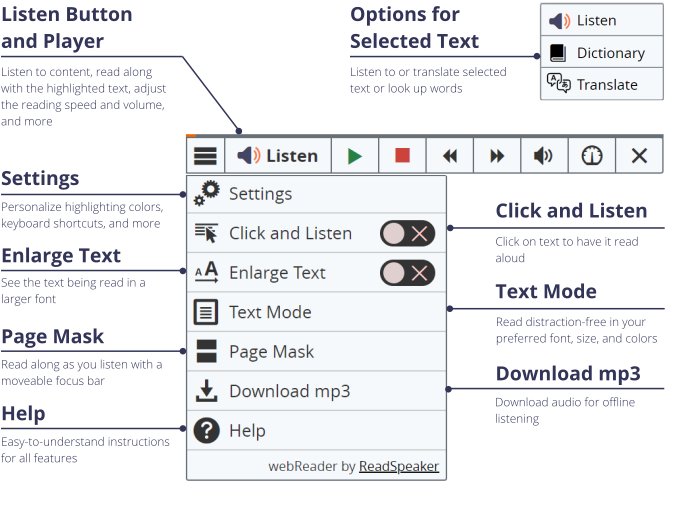
Employees can listen with one click of the Listen button, as well as take digital content with them on the go via an mp3 file.
Test scripts before they go into production.
Allow employees to translate text into their native language or produce audio in multiple languages.
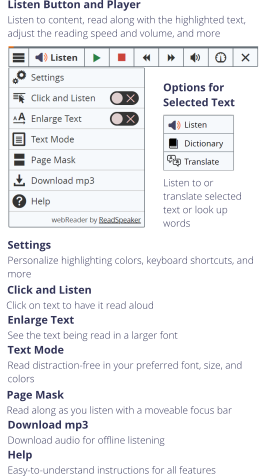
Click and Listen
Natural-sounding voices are the key to cost-efficient and effective assistive technology. Try our award-winning text-to-speech voices, or see some integrations.
Compatible with all leading LMSs, browsers and assessment platforms





















Testimonials
-
Accessible for allRead about British Weight Lifting
“We have had learners thank us for having the system in place as it has made their learning much easier.”
Ashleigh SmeatonEducation Operations Manager at British Weight Lifting -
Flexibility to work internationallyRead why Jutten (now The Simulation Crew) uses Text to Speech
“Because The Simulation Crew’s strategy consists of doing more international business, text-to-speech technology makes the company much more flexible. We no longer have to search for voice actors, and are in a position to produce audio faster and make corrections if necessary.”
Edward BosmaFounder -
Affordable, job-ready learning at scale
“We want to be a true game-changer, providing affordable, career-aligned learning experiences that empower learners to graduate into a job with little to no debt. With ReadSpeaker and Brightspace, we’re on this path to be transformative.”
Dr. Andy SheanChief Learning Officer, Penn Foster Group -
Ensures equal access to digital exams
“When we transferred our exams to digital form, we saw that as an opportunity to add a text-to-speech technology to our exams, so all examinees have the same options when it comes to listening to the exams. The team from ReadSpeaker was always happy to help, were quick to reply to requests and were thorough in their follow-ups. The result is a successful one that has been very useful for our examinees.”
Margrét Birna BjörnsdóttirDrivers Education Specialist, Icelandic Transport Authority -
Helps nervous test-takers show their skills
“Constructiv organises digital exams via assessmentQ for construction workers who often have enough knowledge, but who get nervous when they can only read the questions on a screen. Because of the possibilities offered by ReadSpeaker, in combination with assessmentQ, people will be able to demonstrate what they have to offer.”
Willem Van PeerConstructiv (assessment by Televic Education) -
Support neurodiverse employees
“For those learners with reading difficulties, text-to-speech has opened a world of learning to them and helped improve their literacy levels so they can now communicate using the written word far more effectively. This can have quite significant positive impacts on their employment and lifestyle opportunities.”
Graeme BurboroughGeneral Manager -
Accessible training for all employees
“We work with students who have varying levels of English proficiency. When we show teachers and their students the simple text-to-speech and translation functions within ReadSpeaker, we are greeted with smiles, deep appreciation and even applause. ReadSpeaker is essential to the work we do.”
Danny RubinFounder of Rubin Education -
Support a multi-lingual workforceRead about TP D'Avenir
“Feedback on the project has been overwhelmingly positive. Major players in the construction industry are now expressing a clear need for oral content translation to effectively train non-French-speaking audiences.”
Frédéric CarlierManaging Director at TP D'Avenir -
A voice that doesn't sound like a robotRead why Conforama uses Text to Speech
“I finally found a voice that doesn’t sound like a robot (Roxane). We use voices to enrich our content and make it more accessible. Going through an actor is not cheap and is time-consuming. In addition, as it is easy to use, my collaborators can use the tool at any time for any modifications.”
Gilles MagnierE-Learning & LMS administrator -
Enhance our internal learning materials
“Using ReadSpeaker significantly enhances our internal learning materials. The tools are user-friendly and produce high-quality audio, making our content more engaging and accessible. Working as a contractor for the US Government we appreciate ReadSpeaker’s support and privacy policies.”
Ellumen Inc. -
Flexible Learning Choices for EmployeesRead about Serefin
“As an integrated element within Brightspace, TextAid gives our employees full control over their learning experience, allowing them to adjust key features such as the reading voice, reading speed, text size and highlighting of text.”
Carrie MaynardDigital Learning Design Manager at Serefin -
Enhance learning comprehension for allRead about NeonTrain
“Text-to-speech technology benefits a much wider audience than many people realize. While it’s essential for those with learning disabilities or impairments, it’s also valuable for anyone who may learn better with audio support. ReadSpeaker’s tools enhance learning comprehension and content retention for people of all ability levels.”
Robert BelliveauNeonTrain, Founder and President
Let ReadSpeaker VoiceLab create a voice as unique as your learning environment
Improve internal communications and training outcomes through a unique voice that fully represents your brand.
Find out MoreFAQs about Text to Speech in Corporate Learning
Technology like text to speech (TTS) improves digital accessibility. Accessibility refers to making information readily available and easy to digest for all types of learners.
It’s essential to make workplace training accessible for employees with disabilities or language challenges, who may rely on certain accommodations in order to access content to the same extent as their peers.
However, accessibility tools can also be helpful in making your message clear and understandable for other learners, too. When applied to corporate training, you can expect to see improvements in employee satisfaction and performance.
ReadSpeaker’s TTS solutions have been developed to give every individual an equal user experience in accordance with W3C Web Content Accessibility Guidelines (WCAG).
Yes! Adding text to speech to any type of video content—YouTube videos, online training modules, screencasts, explainer animations, or anything else—will enhance its effectiveness.
With TTS you can:
- Blend on-screen and spoken content
- Add audio descriptions of your video’s content for people with vision impairments
- Emphasize main points
- Provide training in a variety of different languages
Our text-to-speech technology allows you to create quick AI voiceovers directly from a script, whether it’s the actual video screen content or a new script you create to go along with the video. Generating audio voice files is as simple as pasting text into a ReadSpeaker production tool.
ReadSpeaker’s speechMaker Desktop is ideal for adding TTS to videos because it can be used without an internet connection. Once the script sounds just right, download the audio files in the format of your choice and then upload them to your video editor. Your video narration is ready to go!
ReadSpeaker’s lifelike voices are thanks to deep learning technology. Deep learning is a type of machine learning (a subfield of artificial intelligence) that uses deep neural networks, or DNNs—computational models that are highly efficient at expressing very complex mathematical functions.
Explained very simply, we train DNN models to learn about the numerous abstract features of the human voice by feeding them recordings of human speech. DNN models classify this data, passing it through various processing layers and sorting it into more and more complex classifications.
Our neural TTS voices require at least three distinct DNN models, which combine data around pitch, timbre, and rhythm to create the overall voice reproduction. Finally, the output layer of the DNN produces the final result: a TTS voice that sounds uncannily like human speech.
DNN-based TTS systems sound more natural than other types of TTS, and that’s our focus here at ReadSpeaker.
Many organizations choose to use a custom voice to accompany all their digital training material. That makes sense—your training material represents your brand, just like any product!
At ReadSpeaker, we’re happy to work with you to develop an all-original voice for your brand. We start by finding an exceptional voice actor whose vocal qualities echo your brand personality.
Those voice recordings provide the training data that informs our deep neural networks. Then we’ll work with you to further improve the prosody, speaking speed, pitch, and pronunciation accuracy until you approve the final product.
The result is warm, lifelike, synthetic speech that perfectly reflects your brand, ready for use in all your current and future training materials!
The Americans with Disabilities Act (ADA) provides “academic adjustments, reasonable accommodations, and auxiliary aids” for those with physical or cognitive disabilities.
The ADA doesn’t include specific rules for digital accessibility (it was created before the internet as we know it existed!). However, you are likely compliant with ADA if your digital content meets Level AA criteria of the Web Content Accessibility Guidelines (WCAG).
Assistive technologies such as text to speech are an integral part of these measures that provide equal opportunity in the workplace and in education.
Readily available, easily-integrated and dynamically updated.
Level the playing field for all students by instantly creating an audio version of assessments and assignments.
Text to speech integrated quickly, easily and cost-efficiently integrated into any type of content or platform.
Literacy support for struggling readers.


